
SSL Management in DirectAdmin – SSL (Secure Sockets Layer) management is a crucial aspect of maintaining a secure and trustworthy web environment. DirectAdmin offers a straightforward interface for managing SSL certificates, allowing users to implement encryption for their websites with ease. Here’s a detailed look at how SSL management works in DirectAdmin and why it’s important.
Table of Contents
What is SSL?
SSL is a standard security protocol that establishes an encrypted link between a web server and a browser. This ensures that any data transferred between the two remains private and secure. Websites with SSL certificates display a padlock icon in the browser’s address bar, indicating that the connection is secure.
Importance of SSL Management
- Data Security: SSL protects sensitive information, such as personal details and payment information, from being intercepted by malicious actors.
- Trust and Credibility: SSL certificates enhance customer trust, as users are more likely to engage with websites that display secure connection indicators.
- SEO Benefits: Search engines like Google prioritize secure websites, which can improve your site’s ranking in search results.
- Compliance: For businesses handling sensitive data, using SSL can help meet legal and regulatory requirements for data protection.
Managing SSL in DirectAdmin
DirectAdmin provides several features for managing SSL certificates effectively. Here’s a breakdown of the process:
- Accessing SSL Management
- Log in to your DirectAdmin account.
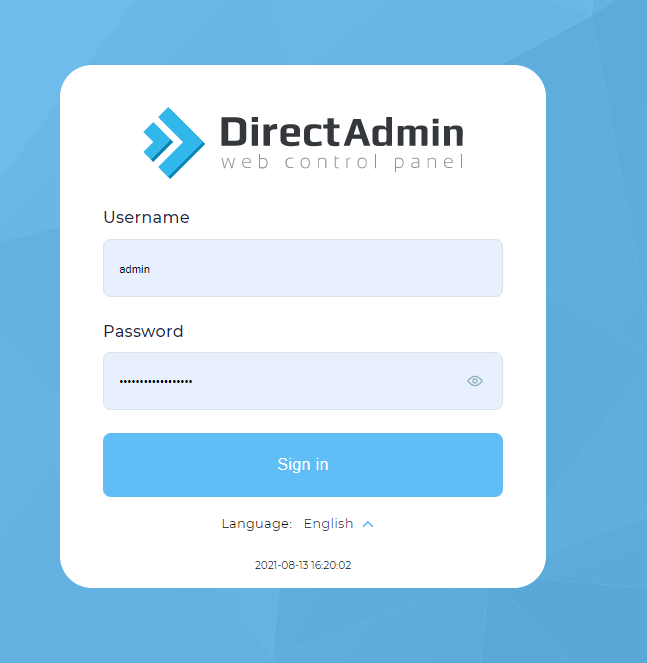
- Navigate to the “User Level” section, where you will find options for managing your domains.
- Installing SSL Certificates
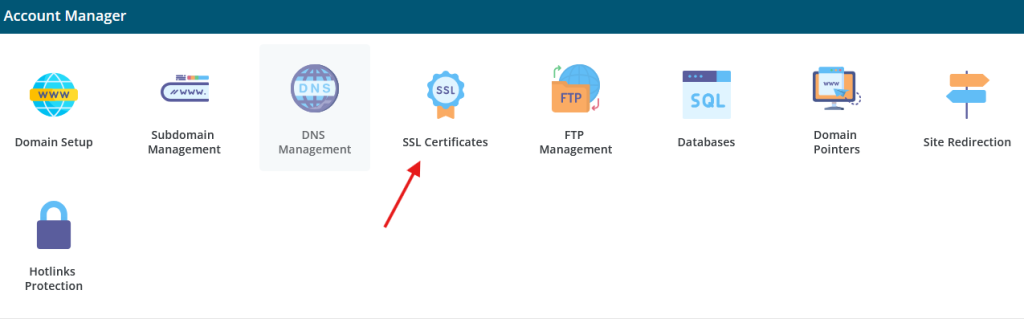
- Select the domain for which you want to install an SSL certificate.
- Click on the “SSL Certificates” icon.
- You will have the option to:
- Generate a New SSL Certificate: Use DirectAdmin’s built-in tools to create a self-signed SSL certificate.

- Paste a Certificate: If you have an SSL certificate from another provider, you can paste the certificate details here.
- Request a Free SSL Certificate: Many DirectAdmin installations come with the option to use Let’s Encrypt, which provides free SSL certificates. Simply choose this option and follow the prompts to obtain and install your certificate.
- Managing Existing SSL Certificates
- Once installed, you can manage your certificates by returning to the SSL Certificates section.
- You can view details of the existing SSL certificate, including its expiration date, and set up renewal reminders.
- Enabling HTTPS
- After installing the SSL certificate, ensure that your website is configured to use HTTPS by default.
- In DirectAdmin, you can enable HTTPS for your domain through the “Domain Setup” section by selecting the “Force SSL” option.
- Renewing SSL Certificates
- SSL certificates have expiration dates, typically ranging from a few months to a couple of years.
- You should keep track of your SSL certificate’s expiration date and renew it before it expires to avoid service interruptions.
- Testing Your SSL Installation
- After installation, use online tools like SSL Labs or your browser’s developer tools to verify that your SSL certificate is correctly installed and that there are no vulnerabilities.
- Troubleshooting Common Issues
- If your SSL certificate isn’t working correctly, check for common issues such as:
- Certificate not matching the domain name.
- Incomplete certificate chain.
- Old cached versions of the site in your browser.
- You can often resolve these issues by re-checking the installation steps or consulting DirectAdmin’s support documentation.
- If your SSL certificate isn’t working correctly, check for common issues such as:
Conclusion
Managing SSL certificates in DirectAdmin is essential for ensuring the security and trustworthiness of your website. By following the steps outlined above, users can easily install, manage, and renew their SSL certificates, thereby enhancing their site’s security posture. Embracing SSL not only protects sensitive data but also boosts credibility and search engine ranking, making it a critical aspect of website management.