

The “Updating failed. The response is not a valid JSON response” error typically occurs when WordPress is unable to receive a valid response from the web server, which blocks you from saving or publishing changes to your site.
This issue frequently arises when updating content and can be frustrating if you’re unsure how to resolve it.
In this guide, we’ll explore the common causes of this error and provide step-by-step solutions to fix it. By the end, your WordPress site should be back to normal, allowing your content updates to be applied correctly.
Table of Contents
What causes the Updating failed invalid JSON response error
The invalid JSON response error occurs when WordPress attempts to communicate with the server but receives an invalid or unexpected response instead of the expected valid one.
JavaScript Object Notation (JSON) is a format used to exchange data between the browser and server. When this error occurs, it disrupts the communication process, leading to difficulties in saving or updating content.
Pinpointing the root cause of the JSON error is essential for applying the appropriate fix. Common causes include:
- Incorrect site URL settings: Mismatched WordPress site address settings can interfere with JSON responses.
- Plugin conflicts: Incompatible or poorly coded plugins can disrupt the JSON response.
- Server configuration issues: Server-side problems or resource limitations may trigger this error.
- SSL/mixed content problems: Mixed content involving HTTP and HTTPS elements can block proper JSON communication.
- Permalink structure issues: Incorrect permalink settings can affect how URLs are processed, causing JSON errors.
Ways to troubleshoot the invalid JSON response error include:
In WordPress, permalinks are the permanent URLs assigned to your posts, pages, and other content, determining how your URLs are structured and Updating failed displayed in the browser.
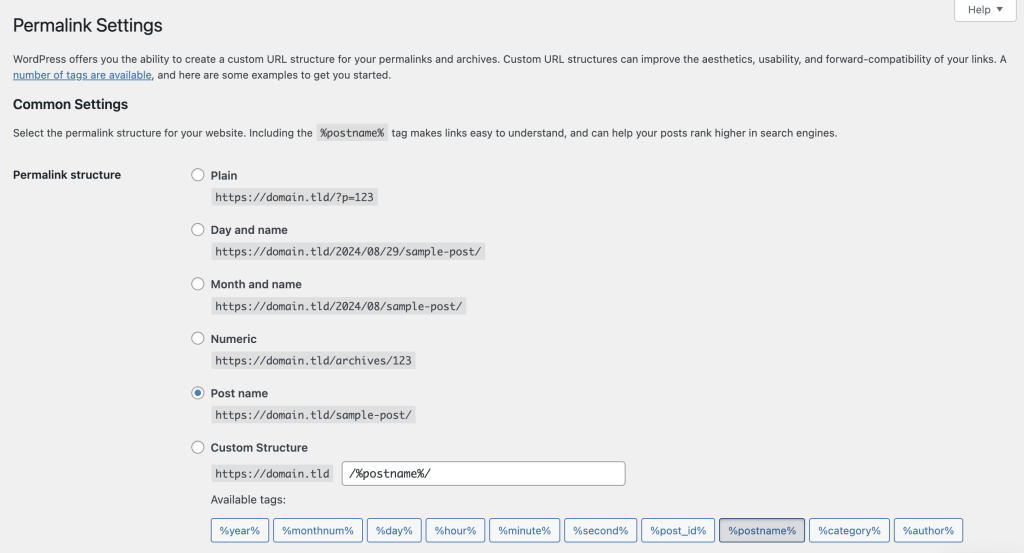
Incorrect permalink settings can break your site’s URL structure, potentially causing issues like the invalid JSON response error. Follow these steps to check and fix your permalinks:
- Log in to your WordPress dashboard.
- In the left-hand menu, navigate to Settings → Permalinks.
- Choose a valid permalink structure, such as Post name.
- Even if you make no adjustments, click Save Changes to refresh your permalink settings.
- Try updating or publishing your content again to see if the error is resolved.
Check your WordPress site address
Incorrect site URL settings can also cause the JSON error on your WordPress website. This issue occurs when the WordPress Address (URL) and Site Address (URL) don’t match or are mistakenly configured.
A common cause is when you’ve recently changed your WordPress domain address but didn’t update both fields. This mismatch blocks the editor from Updating failed receiving a valid JSON response, resulting in the error.
Follow these steps to verify your WordPress site address:
- Access your dashboard and navigate to Settings → General.
- Ensure the WordPress Address (URL) and Site Address (URL) fields match your website’s domain. They should also use the same protocol, either HTTP or HTTPS.
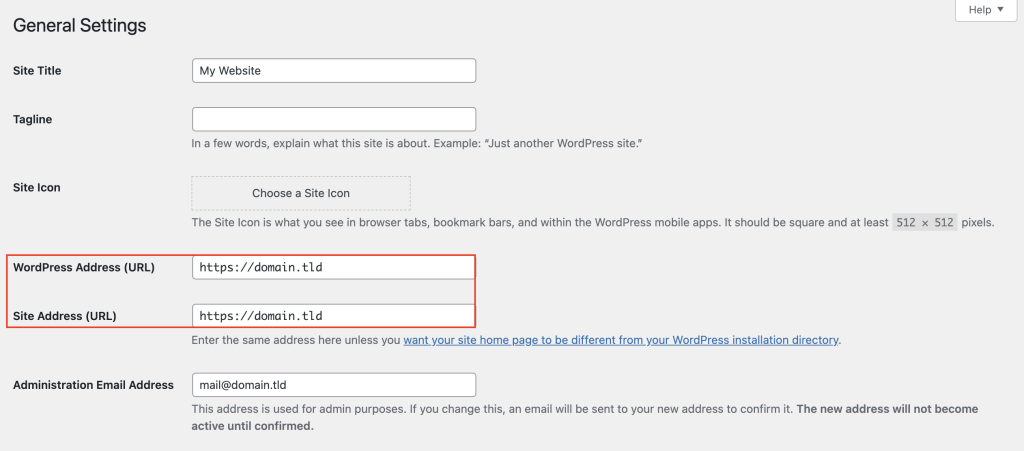
- Click Save Changes to apply the corrections.
Deactivate plugins to detect compatibility issues
Plugin conflicts commonly cause unexpected errors in WordPress, including the invalid JSON response. A poorly coded plugin or incompatible with your current WordPress version may prevent the editor from communicating with the server properly.
Deactivating your plugins can help you identify if one of them is causing the problem. Here’s how to do it:
- From your WordPress dashboard, go to Plugins → Installed Plugins.
- Select all plugins, choose Deactivate from the Bulk actions dropdown menu, and click Apply.
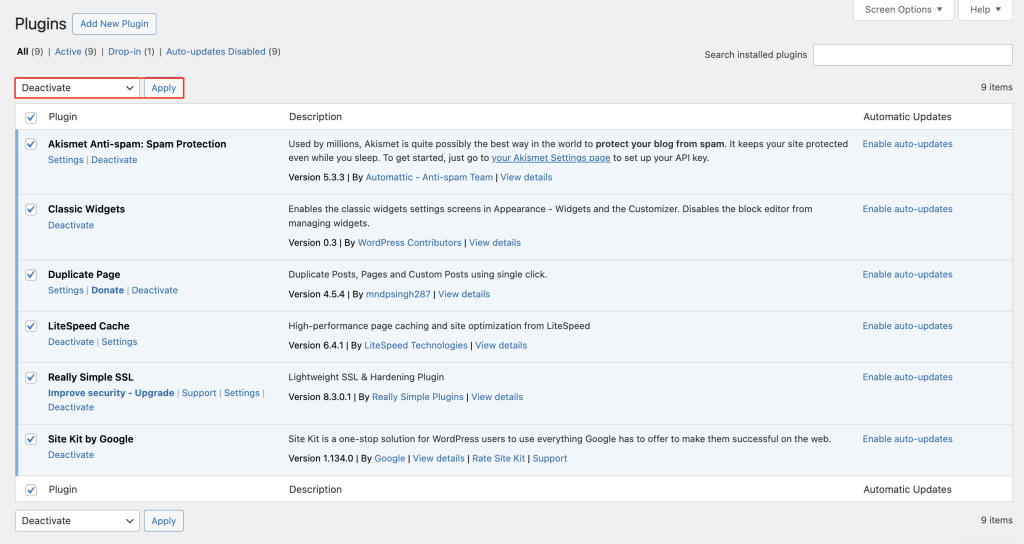
- Update or publish content in the editor again to check if the JSON error persists.
- If the error is resolved, reactivate each Updating failed plugin individually and test the site after each activation to identify the culprit.
- After identifying the problematic plugin, update it to the latest version, find an alternative, or contact the plugin’s developer for support.
Conclusion
The WordPress invalid JSON response error can arise from several issues, such as incorrect URL settings, plugin conflicts, or server configuration problems.
This article has provided several troubleshooting steps, from checking permalinks and disabling plugins to fixing mixed content and viewing the REST API debug log. Implement these solutions methodically to identify the root cause and resolve this WordPress JSON error.
If the problem persists, consider contacting a WordPress professional for further assistance. Should you have any questions or tips for fixing this issue, please use the comment box below.